Multi-Tenant Reservation Platform
A booking platform designed to help service-based businesses manage services, staff, working hours, and appointment requests through one application.
A deployed MVP is available to explore. Development and verification work are still ongoing, so not every feature should be considered complete.
01 / Context
The problem and the solution
Service-based businesses need a practical way to coordinate appointments without relying entirely on manual communication.
The problem
Managing services, staff schedules, and customer appointments can become difficult when information and booking requests are handled across disconnected channels. Customers also need a convenient way to request an appointment.
The solution
The platform brings business management and customer booking into one application. Its multi-tenant approach is intended to support different service-based businesses without tying the product to a single business.
02 / Product
Two sides of the booking experience
The platform supports business operations while giving customers a straightforward way to request appointments.
Business workflow
Tools for managing day-to-day booking operations.
- 1Create and manage services, including descriptions, duration, and price.
- 2Manage staff members and working hours.
- 3Review booking requests and approve or decline them.
- 4Manage the business through administrative permissions.
- 5Allow staff to create bookings for themselves and manage days off.
Customer workflow
A guided process for requesting an appointment.
- 1Choose a service.
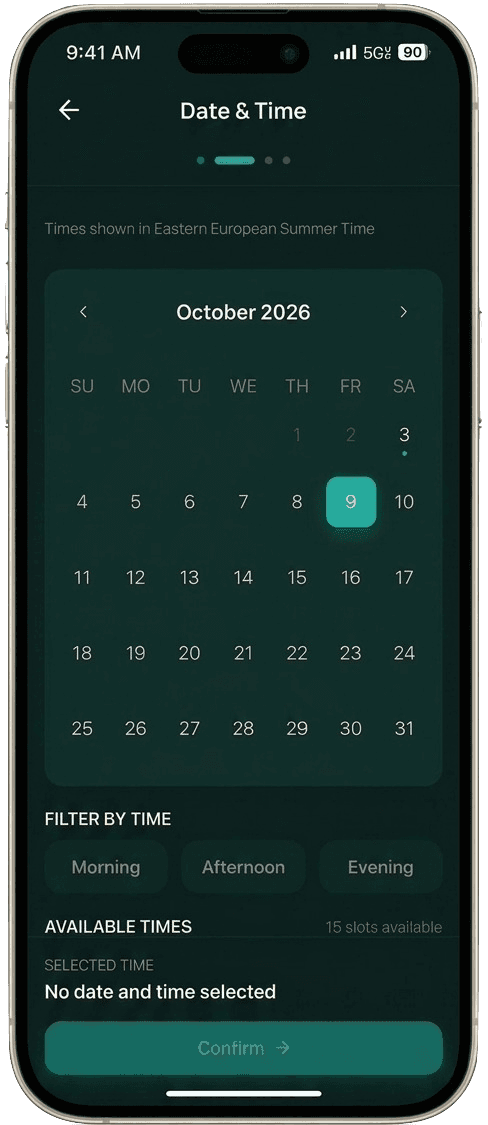
- 2Select a date and available time.
- 3Optionally choose a staff member.
- 4Enter contact details, including name and phone number. Email is optional.
- 5Submit a booking request for the business to review.
Booking requests may require business approval. Submitting a request does not necessarily mean the appointment is confirmed.
03 / Architecture
Designed around tenant isolation
A high-level view of how the application connects users to tenant-scoped data.
Business users
Admins and staff
Customers
People requesting appointments
Application layer
React + TypeScript
User interface, booking interactions, and role-specific experiences.
Supabase Auth
Authentication
Supabase database
Data and configured RLS policies
This diagram is a conceptual overview, not a complete deployment or database schema. Supabase Row Level Security (RLS) is an important part of preventing users from accessing another tenant's protected data. Its effectiveness depends on the actual policies and access paths being correctly implemented.
04 / Access control
Authentication is only one part of security
The application needs to distinguish who a user is, what they are allowed to do, and which business data they may access.
Authentication
Google login or account creation is supported for applicable authenticated users.
Role-based permissions
Admin and staff capabilities differ. Administrative access should not be assumed for every authenticated user.
Tenant isolation
Database policies and access checks must restrict protected data to the appropriate tenant and role.
05 / Development process
AI-assisted development, with human oversight
I use Claude AI and custom Claude Skills to structure development from early problem exploration through deployment. I review plans, make technical decisions, approve the proposed approach, and verify the resulting changes rather than accepting generated code blindly.
- STEP 01
/brainstorm
Clarify the problem, explore alternatives, and decide whether to build, defer, or reject an idea.
- STEP 02
/plan
Turn the selected direction into an actionable implementation plan.
- STEP 03
/sign-off
Review the proposed plan and prepare it for approval.
- STEP 04Human decision
Manual approval
I review the plan and explicitly approve it before implementation.
- STEP 05
Implement
Develop the approved solution.
- STEP 06
/code-review
Review changes for correctness, maintainability, and potential issues.
- STEP 07
/qa
Run risk-based quality checks and manual verification where appropriate.
- STEP 08
/test
Run relevant tests and validate expected behavior.
- STEP 09
/commit
Commit changes after the required quality gates are satisfied.
- STEP 10
/deploy
Deploy the verified changes.
Why this workflow matters
Planning and explicit approval help keep implementation aligned with the intended solution. Code review, risk-based QA, relevant tests, and verification provide additional opportunities to identify problems before delivery. These steps improve discipline, but they do not guarantee defect-free or secure software.
06 / Quality
Testing and verification
Automated tests are part of the development workflow, alongside review and manual checks.
Jest
Used for component and unit tests to check focused pieces of application behavior.
Playwright
Used for end-to-end testing of important user journeys through the application.
The main testing flows have been implemented and are reported as passing in the current project status. This does not mean every feature is fully tested or that all security risks have been eliminated. Relevant lint, build, automated test, and manual verification checks should be run as changes are made.
07 / Current status
A working MVP, still evolving
The reservation platform has a deployed MVP and continues to evolve as implementation and verification work progresses.